How to know Fake ids in Facebook / orkut / twitter...etc  

Posted by Unknown

ഫേസ്ബുക്കിലെ വ്യാജ സുന്ദരികളെ തിരിച്ചറിയാം!!!!!!!!
ഫേസ്ബുക്കില്‍ സുന്ദരികളുടെ പ്രൊഫൈല്‍ കാണുമ്പോള്‍ ആദ്യം ഒന്ന് ക്ലിക്കുന്നവരാണ് മിക്ക ഫേസ്ബുക്ക് മാന്‍മാരും. സൗഹൃദാഭ്യര്‍ത്ഥന അയക്കലാവും രണ്ടാമത്തെ സ്റ്റെപ്പ്. എങ്കിലും ഒരു സംശയം മനസിലുണ്ടാവും. ലെവള് ഒറിജിനല്‍ തന്നെയാണോ എന്ന് !!

ഞങ്ങള്‍ക്കുമുണ്ടായിരുന്നു ആ സംശയം. ചില സുന്ദരികളുടെ പ്രൊഫൈല്‍ കണ്ടാല്‍ എത് കഠിന ഹൃദയനും റിക്വസ്റ്റ് അയച്ചുപോകും. അത്ര പെര്‍ഫെക്ടായിരിക്കും അതിന്റെ രൂപം. പ്രൊഫൈല്‍ കൊടുക്കുന്ന കാര്യത്തിലും പോസ്റ്റ് ചെയ്യുന്ന കാര്യത്തിലുമെല്ലാം ഒരു പെണ്‍സ്റ്റൈല്‍ കാണാം. ഇനി ഒരു റിക്വസ്റ്റ് അയച്ചാലോ ചിലപ്പോള്‍ പെട്ടെന്ന് തന്നെ ഇത്തരക്കാര്‍ അക്‌സെപ്റ്റ് ചെയ്യുകയും ചെയ്യും. നമ്മള്‍ പാവങ്ങള്‍ മിനകെട്ടിരുന്ന് ചാറ്റാനും കമന്റാനും തുടങ്ങുകയും ചെയ്യും. ഇനി മറ്റു ചിലരുണ്ട് കാണാന്‍ നല്ല സൗന്ദര്യമുള്ള പടം ഒക്കെ ആയിരിക്കും. റിക്വസ്റ്റ് അയച്ചാലോ അത് അക്‌സെപ്റ്റ് ചെയ്യുകയുമില്ല …… ഈ അവസരത്തിലാണ് ഫേസ് ബുകിന്റെ മെസ്സേജിംഗ് കടന്നു വരുന്നത് ആര്‍ക്കും പരസ്പരം എന്തും അയക്കാം … നമ്മള്‍ വിടുമോ ഫ്രണ്ട് അക്കിയില്ലേലും കുഴപ്പമില്ല .. ഒരു മെസ്സേജ് അയക്കും ….. മറുപടി മിക്കവാറും ലഭിക്കും കാരണം ആള്‍ വ്യജനാണല്ലോ ..പക്ഷെ ഉള്ളിലിന്റെയുള്ളില്‍ ഒരു മോഹം അപ്പോഴും ബാക്കിയുണ്ടാവും. ലെവള് വ്യാജനാണെന്ന് തിരിച്ചറിയാന്‍ കഴിഞ്ഞെങ്കിലോയെന്ന്? ഗൂഗിളില്‍ ഫോട്ടോകള്‍ സര്‍ച്ച് ചെയ്യാനുള്ള സൗകര്യമുണ്ടല്ലോ. അത് ഉപയോഗിച്ച് നമുക്ക് വ്യാജന്‍മാരെ കണ്ടുപിടിക്കാന്‍ കഴിയും. എങ്ങനെയെന്നല്ലേ


ഒരു സുന്ദരി അവളുടെ പ്രൊഫൈല്‍ ഫോട്ടോ ആയി താഴെ കാണുന്ന പടമാണ് വച്ചിട്ടുള്ളത് എന്ന കരുതകു. ഇനി ഇത് ഒറിജിനല്‍
ആണോ എന്ന് എങ്ങനെ നമുക്ക് കണ്ടു പിടിക്കാം … ഈ പ്രൊഫൈല്‍ ഫോട്ടോ നോക്കാം.

പ്രൊഫൈല്‍ ഫോട്ടോയുടെ മുകളില്‍ വച്ച് മൗസ് റൈറ്റ് ബട്ടണ്‍ അമര്‍ത്തുക വരുന്ന മെനുവില്‍ നിന്നും copy image location സെലക്ട് ചെയ്യുക..ഇനി www.google .com എടുത്തു സെര്‍ച്ച് ടൈപ്പ് ഇമേജ് ആക്കുക … അവിടെ കാണുന്ന ക്യാമറ ഐക്കണ്‍ ക്ലിക്ക് ചെയ്തശേഷം ലിങ്ക് പെയ്സ്റ്റ് ചെയ്യുക … സെര്‍ച്ച് ബട്ടണ്‍ അമര്‍ത്തിയാല്‍ പതിവുപോലെ ഗൂഗിള്‍ പണിതുടങ്ങും. ഇനി കാണാം ആരുടേതാണീ ഫോട്ടോയെന്ന്…നെറ്റില്‍ ആ ഫോട്ടോ എവിടെയൊക്കെയുണ്ടോ അതെല്ലാം സര്‍ച്ചില്‍വരും. മോഷ്ടിച്ചതാണോ, സ്വന്തം ഫോട്ടോ ആണോ എന്ന് തിരിച്ചറിയാന്‍ എളുപ്പവുമാകും.എങ്ങനെയുണ്ട്
ഐഡിയ........................................

Why This Kolaveri Kolaveri Kolaveri Di - Original Lyrics  

Posted by Unknown

Why This Kolaveri Kolaveri Kolaveri Dee?
Rhythm Correct..
Why This Kolaveri Kolaveri Kolaveri Dee?
Maintain This..
Why This Kolaveri? Dee..

Distance’la Moon’nu Moon’nu
Moon’nu Color’ru White’tu
White’tu Background Night’tu Night’tu
Night’tu Color’ru Black’ku
Why This Kolaveri Kolaveri Kolaveri Dee?

White’tu Skin’nu Girl’lu Girl’lu
Girl’lu Heart’tu Black’ku
Eyes’su Eyes’su Meet’tu Meet’tu
My Future Dark’ku..
Why This Kolaveri Kolaveri Kolaveri Dee?

Mama, Notes Eduthuko..
Apdiye Kaila Šnacks Èduthukø..
Papapa Papapapa Papapa Pa Pa..
Šeriya Vaasi..
Šuper Mama Ready.. Ready 1 2 3 4..
What A Change Over Mama..
Ok Mama.. Nøw Tune Change’ju..

Kaila Glass’su.. Only Ènglish’sa..
Hand’la Glass’su
Glass’la Šcøtch’chu
Èyes’su Full’la Tear’ru
Èmpty Life’fu, Girl Cøme’mu
Life’fu Reverse’su Gear’ru
Løve’vu Løve’vu Oh My Løve’vu
Yøu Šhøw Tø Me Bøw’vu
Cøw’vu Cøw’vu Høly Cøw’vu
I Want Yøu Here Nøw’vu
Gød I am Dying Nøw’vu
Šhe Is Happy Høw’vu?
This Šøng’gu Før Šøup Bøys’su
We Døn’t Have Chøice’su

Why This Kølaveri Kølaveri Kølaveri Dee

Fløp Šøng..

————————Nø Tamil.. Only Ènglish’su


How to Post blank facebook status?  

Posted by Unknown

We usually like to update the status which is different from others. Here is how you can post a blank status.

For that just type "@[0:0: ]" without quotes.

Facebook Keyboard Shortcuts  

Posted by Unknown

Facebook Keyboard Shortcuts

Here are some very useful facebook sortcuts for facebook users.


For Chrome Users :
  • Alt + 1 : Go to news feed
  • Alt + 2 : Go to your own profile.
  • Alt + 3 : To see your friend requests.
  • Alt + 4 : To view messages.
  • Alt + 5 : To view notifications.
  • Alt + 6 : Go to your account settings.
  • Alt + 7 : Go to your privacy settings.
  • Alt + 8 : To view facebook's own profile.
  • Alt + 9 : View Facebook Statements and Rights agreement
  • Alt + 0 : Open facebook Help Center.
  • Alt + ? : Go to the facebook search.
  • Alt +m : To compose a new message.


For Firefox users :


  • Alt + Shift + 1 : Go to news feed
  • Alt + Shift + 2 : Go to your own profile.
  • Alt + Shift + 3 : To see your friend requests.
  • Alt + Shift + 4 : To view messages.
  • Alt + Shift + 5 : To view notifications.
  • Alt + Shift + 6 : Go to your account settings.
  • Alt + Shift + 7 : Go to your privacy settings.
  • Alt + Shift + 8 : To view facebook's own profile.
  • Alt + Shift + 9 : View Facebook Statements and Rights agreement
  • Alt + Shift + 0 : Open facebook Help Center.
  • Alt + Shift + ? : Go to the facebook search.
  • Alt + Shift + m : To compose a new message.


If you are using Internet Explorer, then you just have to hit enter after the facebook shortcuts of chrome.

Get back Old Facebook Chat ?  

Posted by Unknown

Get Old Facebook Chat Back

Facebook has introduced new facebook chat interface. But it is a bit complex and not as good as the old one. Here i will show you how to get old facebook chat back. This trick will work only for firefox, chrome and opera.


  • Click according to your browser as shown in the image. After clicking it install the extension in your browser and restart your browser.

  • Open facebook after restarting your browser.

  • After opening facebook, you will see the screen as below.


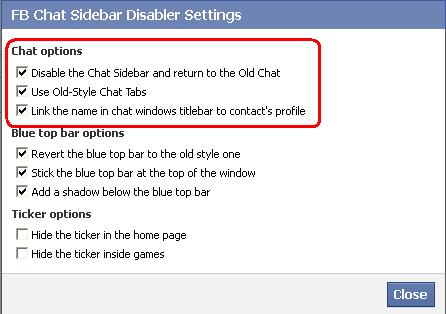
  • Select  the options as shown in the image. You will get these options selected by default, if not then select it manually as shown in the figure.

  • And that's it! You will get the old facebook chat as shown in the image.


If you like this plz share this with your friends and help them to get old facebook chat back.

Open Two Facebook Account In Same Browser  

Posted by Unknown

In todays world many people have more than one accounts in facebook, twitter, gmail etc. But they can't open it simultaneously. I will show you how to open these accounts simultaneously. This trick will only work in firefox. You can open any accounts simultaneously with the help of this trick.


If you dont have firefox then you can download it from the link given below.


After intalling it follow the steps given below.


1. Go to start menu. Click on Run.


2. Type "C:\Program Files\Mozilla Firefox\firefox.exe" -no-remote -p
Then click Ok.


3. After clicking OK you will get screen like below. Click 'Create Profile' on it.


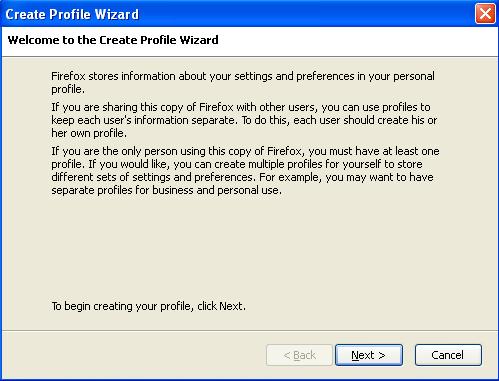
4. After clicking on it, you will receive dialogue box like shown below. Select 'Next' on it.


5. After that type the profile name you want to create.


6. Then click on finish. You will get the dialogue box as under.


7. Now select the profile you want to open and click on 'start firefox'. Uncheck the checkbox as shown in the above figure so that you can select the profile at the time of starting the firefox.

8. To open second account, open firefox in another profile. And that's it! You can open second account in it.


For chrome users, follow steps written below.

1. Log in to the account in chrome.

2. Now press ctrl+shift+N. It will show new icoginto window.

3. Thats it! Now you can open another account in it!

Password Protect your Internet Browser ?  

Posted by Unknown

If you want to protect your browser with password , you can do it easily in chrome by using a simple extension.

If you use 'remember me' option or 'keep me signed in' option in many websites then you should protect your browser from others get access to your accounts.


For this you can use startup password extension awailable in chrome extensions.

Go to this link to get it.

Simple Startup Password

Install this extension to chrome.

Then go to Settings > Tools > Extensions > Simple Startup Password > Options.
Set password.
It will ask password every time you start your browser.

blogspot visit counter