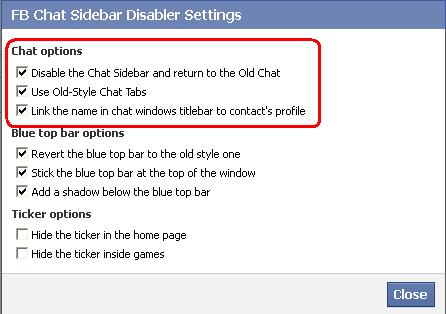
Facebook has introduced new facebook chat interface. But it is a bit complex and not as good as the old one. Here i will show you how to get old facebook chat back. This trick will work only for firefox, chrome and opera.
For that go to the site given below from your browser.
In todays world many people have more than one accounts in facebook, twitter, gmail etc. But they can't open it simultaneously. I will show you how to open these accounts simultaneously. This trick will only work in firefox. You can open any accounts simultaneously with the help of this trick.
If you dont have firefox then you can download it from the link given below.
2. Type "C:\Program Files\Mozilla Firefox\firefox.exe" -no-remote -p Then click Ok.
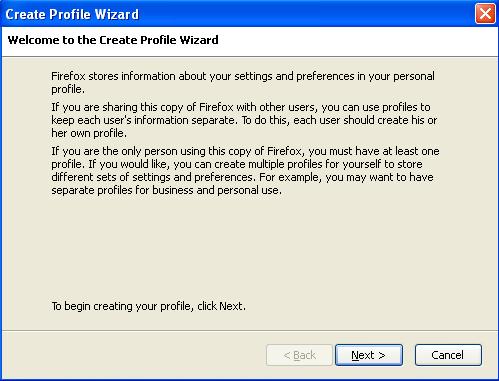
3. After clicking OK you will get screen like below. Click 'Create Profile' on it.
4. After clicking on it, you will receive dialogue box like shown below. Select 'Next' on it.
5. After that type the profile name you want to create.
6. Then click on finish. You will get the dialogue box as under.
7. Now select the profile you want to open and click on 'start firefox'. Uncheck the checkbox as shown in the above figure so that you can select the profile at the time of starting the firefox.
8. To open second account, open firefox in another profile. And that's it! You can open second account in it.
For chrome users, follow steps written below.
1. Log in to the account in chrome.
2. Now press ctrl+shift+N. It will show new icoginto window.
3. Thats it! Now you can open another account in it!
If you want to protect your browser with password , you can do it easily in chrome by using a simple extension.
If you use 'remember me' option or 'keep me signed in' option in many websites then you should protect your browser from others get access to your accounts.
For this you can use startup password extension awailable in chrome extensions.
Present day we can find many laptops in the world, so we cannot easily choose our best laptop for you. So here I am giving your guidelines for buying or purchase a best laptop or computer in store. If you follow the below guidelines then you can buy a best and life long laptop for you. Let us check here.
Complete buying guide for laptop/Notebook or computer
Now a day's laptops comes with very cheap price in India, so this is common item which is used in Indian families, and the competition also high to desktop, laptop and computer sales in the retailer market of India. Already more than 500 laptop companies available in India, now many new laptop companies also launched here. So we cannot find the best laptop easily, that is very difficult for everyone. If you are not buy best and great laptop with good features then I can surely say to you, whole your money will be waste.
So I have made one article for you which will you guide for purchase a best laptop for you. This article surely will help to buy one best laptop for you as soon as possible, most of peoples not aware about quality of laptop and configuration, so here you can find which configuration is best for laptop. For buying one laptop we have to consider many factors while purchasing in store, but most of peoples simply buying and wasting their money, so here I guide you for buying a best laptop for you.
which is best Screen size of Laptop?
Most of peoples not giving preference to screen size, screen size also important factor to be consider while purchasing a laptop as well as processor. Processor is most important factor to be considered to purchase a laptop, but at the same time we have to give some importance to screen size.
Most of peoples thinking in wrong way, that is wide screen is best for laptop, but it's not true. For example consider that If you are a student, Or a teacher, or a businessperson, then you don't need to use wide screen big laptop. Consider if you are one video editor or a graphic designer or a gamer then you need one huge laptop with wide screen. So which size is better for one laptop? check below.
a) 12", 12.1" and 13.3" b) 14", 14.1" c) 15", 15.4" d) 17" or more
which type of Processor is best for Laptop?
Next think is that processor; processor is most important factor to be considered during buying one laptop. Most of peoples do not care for processor that is wrong. If you buy a laptop with poor quality processor then your laptop will be completely spoiled and your money also wastes. Processor is very important for one laptop which will give that ultimate speed for you. Let's use the below processor which is best for one laptop.
Intel core i3 Intel core i5 Intel core i7
Battery Life of Laptop
The battery is very important factor for one laptop, basically battery comes with following models such as 4 cells, 6 cells, and 9 cells. In my point of view please do not go for 4 cell batteries while you going to some places, because this battery will give you less life time or usage time only, that is not more than 1.5 hours.
The 6 cell batteries are generally best battery for everyone, because it gives more usage time for you, that is approximately 2.5 - 3.5 hours, that is optimum for everyone.
The 9 cell batteries is really very good choice for everyone ( in laptop) because it gives 4-6 hours battery life, so this is really helpful for everyone when they are travelling on outside. Friends please don't use AMD processors in laptop that will bring poor quality in batteries.
Most of peoples do not using suitable AC adapters for one particular laptop. You must use a 65w adapter for 6 cell batteries and 90w adapters for 9 cell batteries.
Connectivity of Laptop
Your laptop should configure with wireless 802.11g (wifi) at least, it is minimum requirement for one laptop. You know one thing the 802.11b routers gives you better speed and stability. If you identify any laptop in store with wifi 802.11n series that is really best for you which has third generation wifi routers with unbelievable performance, that will bring good speed than 802.11g routers.
Which RAM Size is best for Laptop?
The Random access memory is important factor for one laptop; because it will give you speed of one particular laptop. So we have to consider RAM size while we purchasing on a store. You should buy a laptop with upgraded RAM.I. You should buy one laptop with at least 1GB RAM upgrade it. Generally 2 GB ram is best for one laptop, because it gives good usage speed for everyone. If you use your laptop for entertainment purpose such as gaming purpose then 4GB RAM size is best for you.
Hard disk of Laptop
The Hard disk is the storage space or source of any laptop or computer. Generally 3 types of hard disk is available such as 4200 rpm, 5400 rpm, 7200 rpm (both SATA and ATI). You should not go for 4200 rpm hard disk because it will not give you higher performance. If you need higher and outstanding performance laptop then you may go for . You should understand that 5400 rpm hard disks are not good because they will eat the battery life time in your laptop. We can easily upgrade of laptop, you know one thing thus the 320 GB hard disks is really good and best hard disk for everyone that will give you large memory space for you/
Graphics Cards of Laptop
The Graphics cards also important factor for one laptop, because if you installed any high quality graphic card, then that will give you better gaming experience for you. So if you use your laptop for gaming purpose then you must install with high quality graphics card.
Warranty of Laptop
Don't forget to buy a laptop with at least 1 year warranty. Because most of peoples buying a laptop with low quality, those are not having warranty offer. So I suggest you too buy a laptop with 1 year or 2 year warranty for your laptop.
Did you like this resource? Share it with your friends and show your love!